




Ruff替代black、isort、flake8超快速完成python代码的静态检查和格式化代码
Ruff是一个用Rust编写的超快速Python代码分析和格式化工具,它将传统的linter(如Flake8)和格式化器(如Black、isort)的功能集于一身,能以极快的速度检查代码错误、风格问题,并自动修复,旨在提高开发效率和代码质量,支持配置、自动修复和对多种流行工具规则的兼容,“An extremely fast Python linter and code formatter, written in Rust.”
使用ruff和本文配置,可以实现:
- 自动保存代码并按照要求格式化代码
- 自动优化python代码的import并排序
- 自动按照语法要求,对python代码静态检查
Ruff速度上的优势明显
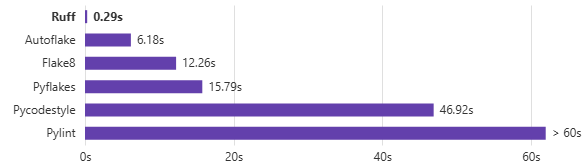
Ruff源码和使用手册地址
github地址:astral-sh/ruff: An extremely fast Python linter and code formatter, written in Rust.
官方文档地址:Ruff
网上测评ruff: Ruff 高性能Python代码检查工具 | 熊大如如的猪窝
推荐使用AI问答,自动生成完整的ruff实战配置
安装和部署在vscode
一键安装ruff 和 vscode的ruff插件
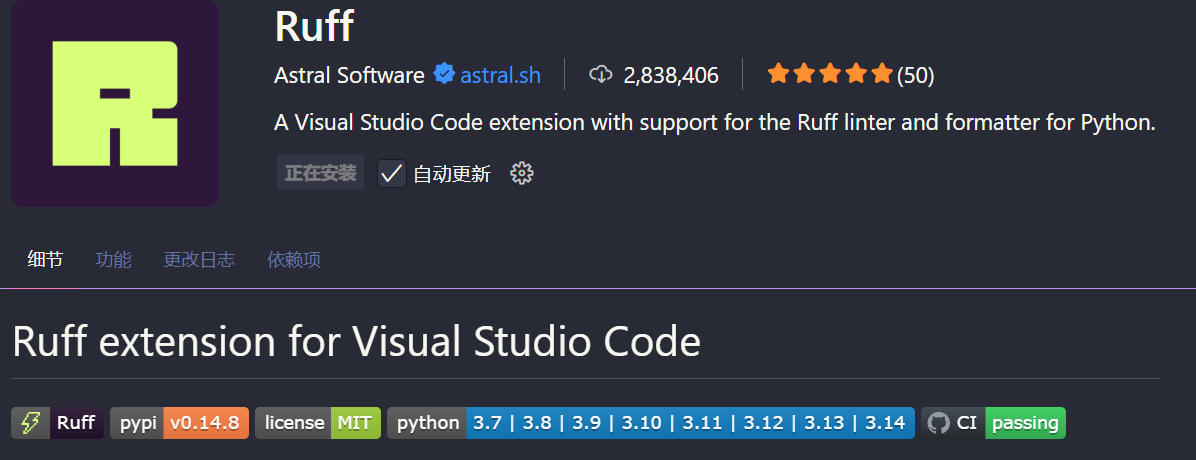
pip install ruff
在代码根目录配置的.vscode里添加settings.json
{
    // 默认用Pylance,可选: Jedi, Pylance
    "python.languageServer": "Pylance",
    // 需要python的版本大于3.7,建议python3.9
    "[python]": {
        // 使用ruff进行格式化(替代black)
        "editor.defaultFormatter": "charliermarsh.ruff",
        "editor.formatOnSave": true,
        "editor.formatOnType": false, // 输入时自动格式化
        "editor.codeActionsOnSave": {
            "source.organizeImports.ruff": "explicit", // 使用ruff自动排序导入(替代isort)
            "source.fixAll.ruff": "explicit" // 自动修复ruff问题(替代flake8)
        }
    },
    // Ruff配置(替代black、isort、flake8)
    // 使用原生语言服务器(推荐)
    "ruff.nativeServer": "on",
    "ruff.interpreter": [
        "${workspaceFolder}/.venv/bin/python"
    ],
    "ruff.lineLength": 100,
    // 原生服务器通过 pyproject.toml 或 ruff.toml 配置规则
    // 以下配置仅供参考,实际规则应在项目配置文件中设置
    // 禁用 flake8,使用 ruff 替代
    "flake8.enabled": false,
    "python.analysis.typeCheckingMode": "off",
    "python.analysis.autoImportCompletions": true,
    "python.analysis.autoSearchPaths": true,
    "python.analysis.extraPaths": [
        "./src"
    ],
    // 编辑器体验优化
    "editor.rulers": [
        100
    ], // 显示100字符标尺线
    "editor.wordWrap": "bounded",
    "editor.wordWrapColumn": 100,
    "editor.smoothScrolling": true,
    "editor.minimap.enabled": true,
    "files.autoSave": "afterDelay",
    "files.autoSaveDelay": 1000,
    // Python特定优化
    "python.terminal.activateEnvironment": true,
    "python.defaultInterpreterPath": "./.venv/bin/python"
    // 注意: 使用ruff扩展(charliermarsh.ruff)替代black-formatter、isort、flake8
    // ruff是一个更快速的Python linter和formatter,可以替代多个工具
}
在代码根目录新增配置ruff.toml
# Ruff 配置文件
# 替代 black、isort、flake8 的统一配置

# 行宽限制
line-length = 100

# 目标 Python 版本
target-version = "py39"

# 排除的文件和目录
exclude = [
    ".git",
    "__pycache__",
    ".venv",
    "docs/source/conf.py",
    "old",
    "build",
    "dist",
    "*.egg-info",
    ".eggs",
    "alembic/versions",
]

# 源代码目录
src = ["src"]

[lint]
# 启用的规则
# E = pycodestyle errors
# F = pyflakes
# W = pycodestyle warnings
# I = isort (导入排序)
# UP = pyupgrade (Python 版本升级建议)
# B = flake8-bugbear (常见 bug 检测)
select = ["E", "F", "W", "I", "UP", "B"]

# 忽略的规则(与格式化兼容)
ignore = [
    "E203",  # 空格在 : 前(与 black 兼容)
    "E501",  # 行太长(由 formatter 处理)
    "W503",  # 二元运算符前换行(已弃用)
]

# 允许自动修复的规则
fixable = ["ALL"]
unfixable = []

[lint.isort]
# isort 配置(替代原 isort.args)
combine-as-imports = true
force-single-line = false
known-first-party = ["app"]
section-order = ["future", "standard-library", "third-party", "first-party", "local-folder"]

[format]
# 格式化配置(替代原 black-formatter.args)
quote-style = "double"
indent-style = "space"
skip-magic-trailing-comma = false
line-ending = "auto"
谢谢关注收藏
✨点击【关注】锁定宝藏库,从此升职加薪不迷路
我的博客网站:
https://funkygod.vip
我的微信公众号

📢 腾讯云限时福利
有云服务器、CDN、对象存储、网络防护等需求的朋友,欢迎联系下方腾讯云官方销售 👇
轻量云主机限时优惠
RackNerd
☁ 主机显示特惠:只要80元(3TB流量,1vcpu,50GB硬盘),且多区域IDC机房。
购买地址:https://my.racknerd.com/aff.php?aff=14942

CloudCone
CloudCone 特惠轻量云主机:购买地址:https://app.cloudcone.com/?ref=12332

评论区